Seno 50-c camera app and WiFi issues

-

Same problem. No network, tried everything. Can't wait someone to answer, what to do.
1 -

Hi,
I had the same problem, you have to make sure that you open the app first, then press the camera button... the light needs to turn turquoise on the unit.....
Only once you have that turquoise light will the wifi network should show up on your smart phone wi-fi list!
1 -

Having the same issue. Brand new today, updated to version 1.2.2 and still cant connect the camera app.
Seems like this is a common issue, it would be good if Sena answered these posts.
1 -

Thank you Tash! That worked for me. It was not intuitive at first. Starting the camera app first did the trick.
0 -
I tried opening the app first, but it didnt work. Had to do a factory reset and now its working.
0 -

Sena, Please replace my product or can your 50C unit! You make us pay 400 USD for a unit that doesnt work with the most common basic feature which is Wi-Fi!
1 -
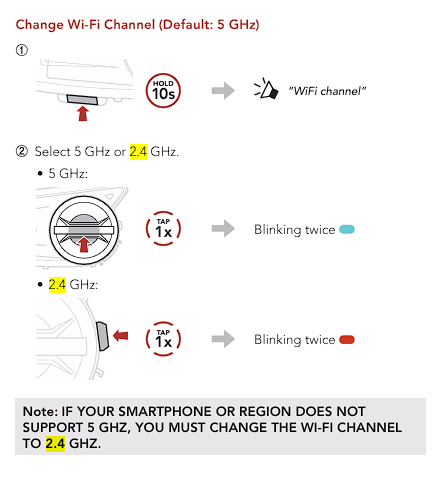 Hope this helps, Wi-Fi signal should show up!0
 -

Same problem… I did factory reset, I did 5ghz and 2.4 ghz… I bought this product from my germany visit. I can’t see camera wifi on my phone. I can do manualy camera recording but can not see wifi on my phone, help?
0 -

Tried everything, never got it working, using lexar sd card, formatted to fat32 on comp as it wouldn't format in unit. Unit won't produce wifi, won't connect to camera app and camera doesn't work.
0
Bitte melden Sie sich an, um einen Kommentar zu hinterlassen.
Kommentare
9 Kommentare