Vortex Charging

Why doesn't the new Vortex charge by the charging port permitting for a faster charge compared to the wireless charging?
-

Hi. The VORTEX features our Fast Charging feature and will charge faster with the USB-C cable than it will when charging it wirelessly.
0 -
My point exactly....if the USB charging feature actually worked. The wireless charging works as stated, however neither of two different devices were able to accept a charge by cable. Please see my previous post on this topic.
0 -
Sena you may have a production problem with the Vortex. If one device failed to charge by USB, I could possibly think that this particular device may be defective. However, when two brand new devices are displaying the same problem, something definitely went wrong while producing them. As I stated before, the wireless charging option works as intended and that's fine with me. I can do without the USB charging option, but how many of your customers will need to use the cord even for their first charge? Just saying. Take it or leave it.
0 -

If you mean the new Sena VORTEX, it actually does support USB-C charging. Sena has confirmed that the charging LED should light up when using the supplied USB-C cable.
If yours only seems to charge wirelessly, I would first check the cable, charger and USB-C connection. If the wired charging still does not work it may be a faulty unit rather than a limitation of the VORTEX.
If you mean a different Vortex product, tell me the exact model and I willll check its charging specifications.
0 -

Has anyone else experienced this with the Vortex charging? It would be helpful to know whether the issue happens with different cables or chargers as well, since that could help narrow down the cause.
0 -
Here is some information to clear up some confusion on charging the VORTEX using the supplied USB-C cable. According to the User's Guide for the VORTEX the charging LED is labeled as #3. However, that is only when you are using a wireless charger and not the supplied USB-C cable. When you plug only the supplied USB-C cable to charge the VORTEX while it is not on a wireless charger then the charging LED where the red arrows are showing (which is not labeled on the User's Guide) will light up. In addition, if you are using a USB-C cable to charge the VORTEX then the charging LED labeled as #3 will not light up.
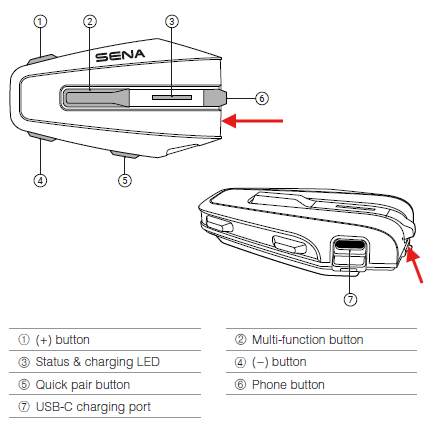
As such, we will update the User's Guide for the VORTEX to make this more clear for our users.
0 -
nice
0
Iniciar sesión para dejar un comentario.
Comentarios
7 comentarios