connection

TFT will find sens smh5 but will not connect. smartphone will not find sena. has been fine for 18 months now it will not connect at all, have done upgrade, deleted all pairings and factory reset but to no avail.
any suggestions welcome.
-
Commento ufficiale

delete pairings on the SMH5 and try again, see if SMH5 pairs to your phone as well to see if its related to the SMH5.
press and hold the jog dial until you hear configuration menu the navigate until you hear delete all pairings.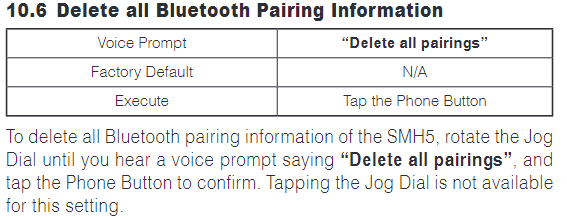
-

I am having problems connecting my Sena 20S evo to my Dell Inspiron 3030 desktop PC running Windows 11.
It just will not find the device, I have tried turning off memory integrity and installing the 64 bit version
I have tried different USB ports, leaving the Sena turned off and turning it on but it will not go past this screen, if I click cancel it will then carry on with the install and install the actual driver but it will then still not work.
Then when I try to turn memory integrity back on, it won’t turn on because of the driver issue.
I have to uninstall the driver the settings to then be able to turn memory integrity back on.
0
Accedi per aggiungere un commento.
Commenti
2 commenti