SF 2

-
Official comment

Hello,
Please make sure you restart the device after enabling Audio Multitasking.

-
Hello Alex
I deleted and set new the Firmware
- activated Audio Overlay
- activated Vox Sensitifity
- installed the Sena Application in my Phone
- turned off and on both devices many times
Currently I can talk to my Partner or we can listen Music together....
but
I can not find the settings for listening Music and talking in same time.
I have contact to another Sena People too. He told me same than you and it looks like that you are only a BOT or Theory Guys and you don´t know really the Solution.
I need Instructions how to set talking and listening Music in same time. Or if available - also a Video could help.
In the Manual is nothing to find how to set.... only that it is available.
In the Application at my Cellphone it`s the same.. I can only share talking or Music... when I open talking, then Music closes and opposite.
Would be nice if you have a real Advice..
0 -
The SF2 has the ability to have foreground and background sources playing. If you look at the combination chart for the SF1/2, it shows that you can use the intercom and music or smart navi simultaneously.
However, phone call functions and intercom functions are two completely different features. If you're referring to using the phone call function while listening to music, this will not work.
The only combination that will work is the intercom and music. since it was not made clear to me which method of intercom you are using I can't pin point the issue properly.
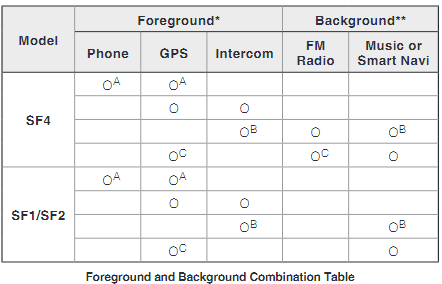
if you read the user guide it specifically states in asterixis, that matches the chart.
* Two audio sources in the foreground can be heard simultaneously with the
same volume level.
** Only one background source can be heard at a time while listening to an
audio source in the foregroundIn addition to the headset configuration menu, you can change the settings of the SF Series through the Sena Device Manager or the Sena Motorcycles App. To find the audio multitasking option, when you are paired to your phone, open the phone app and click on the gear icon on the top right. You will then see the option displayed.
0 -

Make sure both Sena SF 2 headsets have the latest firmware update. Outdated firmware can cause compatibility issues and limit functionalities. Refer to Sena's website or app for update instructions. @basket random
0 -
@ Barlow Jenkins
The firmware is the latest.. already checked 3 times
0 -

Hi can someone help me with providing me the manual for the use of my (new) SDF2 communication System ?
0
Please sign in to leave a comment.
Comments
6 comments