Sena srl mesh - can't adjust volume with +/- buttons

So I have the sena srl mesh with firmware 1.5. Everything seems to work fine except the plus and minus buttons can't be used for adjusting the volume. If I play something from spotify and press the plus button the voice says "group intercom". If I press minus, nothing happens.
I can adjust the volume from the sena app (running on an iphone 13 pro) or from the iphone +/- buttons.
I tried to do a factory reset but when the voice says "configuration menu" I cant get to the menu alternative. Plus button only gives a beep and minus button does nothing.
-

When the SRL is not working properly or is in faulty status for any reason, you may reset by pushing the pin-hole reset button located next to the DC Power Charging & Firmware Upgrade Port. Insert a paper clip into the reset pin-hole and press the reset button for a second with light pressure. The SRL will be switched off, and you have to turn on the system back on and try again. However, this will not restore the headset to factory default settings.
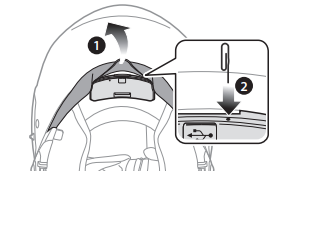 0
0 -
Tried this. Headset resets but acts the same when turning on again.
0 -
So, whats the best strategy here? Should I try to reinstall the latest firmware? Or maybe downgrade?
0
Please sign in to leave a comment.
Comments
3 comments