Logo
Community Submit a request
Sign in
  1. Sena Technologies Help Desk
  2. Accessories
  3. BLUETOOTH MIC & INTERCOM
  4. Getting Started

Menu

Articles in this section

  • BLUETOOTH MIC & INTERCOM User's Guide Location
  • Checking the Battery Level
  • Power On and Off
  • Button Functions
  • Volume Adjustment
  • Connecting Your Headphones
  • Function Priority
  • Factory Reset
  • Fault Reset
  • Learning about the Sena Bluetooth MIC & Intercom Quick Start Guide

Power On and Off

Pablo Motta
Pablo Motta
July 23, 2019 21:02 Updated

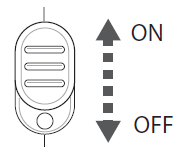
To power on the Bluetooth Mic, slide the power switch to on. The blue and red LEDs will turn on. To power off, slide the power switch to off.
 

Was this article helpful?
0 out of 0 found this helpful
Have more questions? Submit a request
Return to top

Related articles

  • Basic Operation
  • Fix for Windows 10
  • Group Intercom
  • Powering On and Off
  • Operating Time

Comments

0 comments

Article is closed for comments.

About

  • Company
  • Careers
  • Contacts
  • Store Policies
  • Dealer Location
  • Ethics and Compliance

Product

  • Motorcycles
  • Cycling
  • Outdoors
  • Marine
  • Industrial
  • Networks

Community

  • People
  • Events
  • News
  • Blog

Copyright © . Sena Technologies Help Desk All Rights Reserved.

Deutsch Español Français Italiano