Logo
Community Submit a request
Sign in
  1. Sena Technologies Help Desk
  2. Industrial
  3. TUFFTALK M

Menu

Articles in this section

  • Tufftalk M User's Guide Location
  • FIRMWARE UPGRADE
  • Group Intercom
  • Two-Way Intercom
  • Starting Mesh Intercom
  • Mobile Phone Call Making and Answering
  • Mobile Phone Pairing - Mobile Phone
  • Button Operation
  • FM Radio On/Off
  • Fault Reset
See more

Fault Reset

Bebe Godoy
Bebe Godoy
February 12, 2020 23:04 Updated

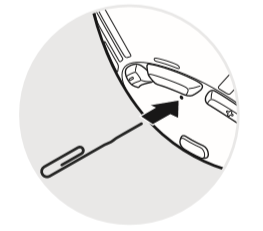
When the headset is not working properly or is in faulty status for any reason, you may reset by pushing the pin-hole reset button located below the Center Button.
mceclip0.png

Was this article helpful?
0 out of 0 found this helpful
Have more questions? Submit a request
Return to top

Related articles

  • Factory Reset
  • Factory Reset
  • Fault Reset
  • Fault Reset
  • Sena Device Manager

Comments

0 comments

Article is closed for comments.

About

  • Company
  • Careers
  • Contacts
  • Store Policies
  • Dealer Location
  • Ethics and Compliance

Product

  • Motorcycles
  • Cycling
  • Outdoors
  • Marine
  • Industrial
  • Networks

Community

  • People
  • Events
  • News
  • Blog

Copyright © . Sena Technologies Help Desk All Rights Reserved.

Deutsch Español Français Italiano